What's New in Excel Agents: September 2026

Audit and finance teams work under real pressure, but they have no room to compromise on accuracy, standards, and governance.
To meet this reality, we keep building purpose-built AI that works the way audit and finance actually work. Excel Agents is a core part of that effort, automating end-to-end analysis and testing directly in Excel, with every output traceable back to the source and ready for review.
Today we're sharing the latest Excel Agents updates: from faster ways to get started with agentic workflows to a smarter overview of how your organization is using AI, so your team can scale with confidence.
Prebuilt Agents
Audit and finance work is largely standardized, but every organization executes it differently. Maintaining consistency across teams takes time. Building agents that teams can share is a powerful way to scale best practices, but everyone needs a starting point.
Prebuilt Agents provide that foundation. It includes a library of 50 ready-to-use agents developed by our experts to give you a massive head start.
Chat into Agent
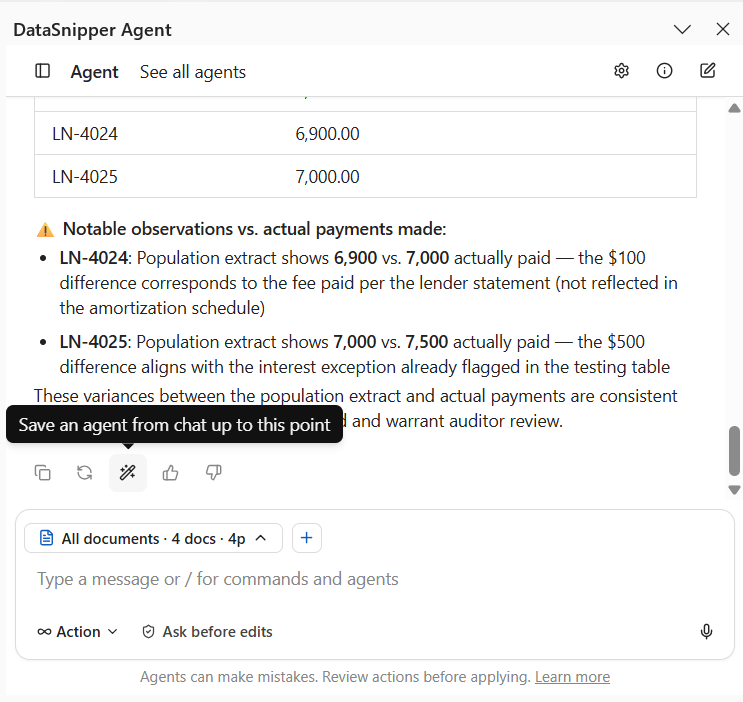
Did you find a workflow you would love to save while talking with Excel Agents? With Chat into Agent, you can turn that conversation into a reusable agent in one click.
Select “Save as agent” and your conversation will be turned into a private draft in Agent Builder. From there, you can review, refine, and publish it. Once published, you can run that agent without rebuilding the prompt from scratch, as many times as you want. The best approaches your team discovers don't have to disappear at the end of a chat.
Planning Mode
For complex, multi-step tasks, auditors often want to agree on the approach before the agent starts executing.
Planning Mode separates planning from execution. Instead of acting on your prompt right away, the agent first reviews your workpaper and imported documents, asks up to three short clarifying questions if anything is unclear, and proposes a plan. You review it, adjust it as needed, and approve when it's good to go. From there, the agent gets to work, checking off each step as it completes it.
Clarifying questions and plan revisions are free; only running the plan uses a message. The result is better outcomes on the first try, with less rework and better cost-efficiency.
Voice to Text
Prompts with richer context produce better results. Speaking is often faster than typing and tends to produce more detail, so agents get more context from the start.
Tap the mic button in the agent input and give your instructions out loud. Voice to Text turns your words into editable text before you send, so you can review and adjust your prompt first.
It automatically detects multiple languages with no configuration needed, so you get more context in your first prompt without any extra effort.
Activity log: per-action detail
Each row also includes the Cells Affected column, showing which cells the agent's action touched. It's clickable, enabling users to jump to changes, so reviewers can go straight from the log to those exact cells in one click.
For firms with PCAOB AS 1215 requirements, an audit file needs to show who performed the work, who approved the agents, and the date of review. This feature meets audit and finance teams’ reviewability and traceability needs.
View-only role for Agent Builder
This gives organizations more control over who manages the agent library without restricting access to run agents. Each organization sets the rules they're comfortable with, while everyone can benefit from their agents.
Tags, search, and filters for your agents
Organizations are building more custom agents. You can find the right one instantly with tags, search, and filters.
Create your own tags, such as department or team, and assign them freely to any agent. From there, search by name or description, filter by tag, status, or creator, and sort to find what you need fast.
This is available on DataSnipper and DataSnipper for Excel, with no setup required. Everything stays organized as your library grows.

Consumption Dashboard
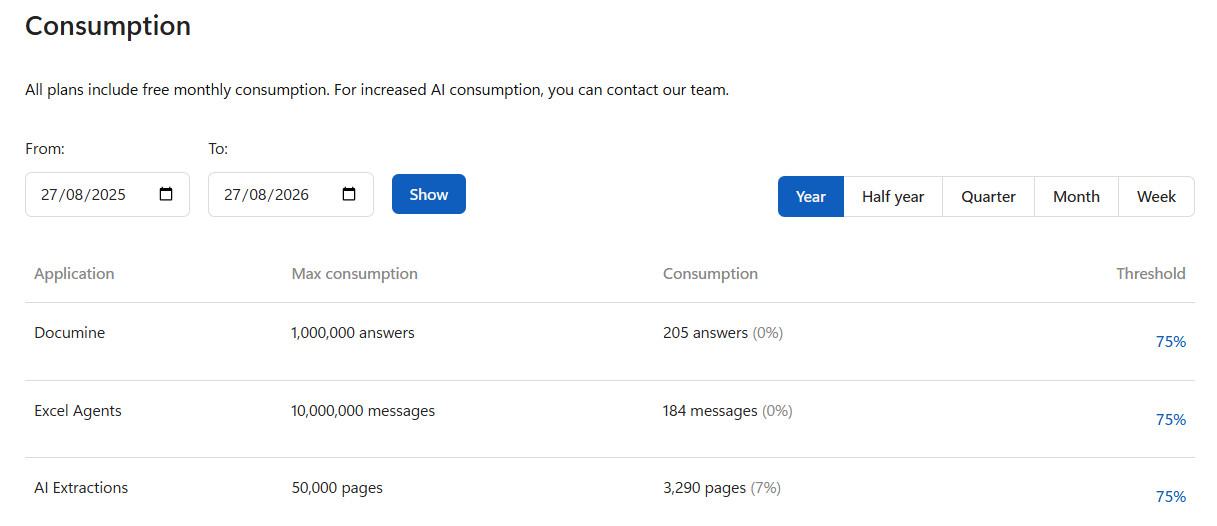
Rolling out AI across a team comes with a question every admin eventually asks: how much is this actually costing us?
With DataSnipper, the answer is clear. The Consumption Dashboard gives admins a unified overview of AI usage across all DataSnipper products, broken down by product and by month. You can set configurable thresholds and get notified before you hit a limit, so costs never catch you off guard.
More control and more value in every run
With DataSnipper, AI handles the procedure so professionals can focus on the insight, reviewing what matters, and signing off with confidence.
These updates push that further. Workflows run more efficiently, teams get more visibility into what's happening, and admins gain more control over how the work gets done, all with the traceability and governance that audit and finance require.
The work keeps getting done. The judgment stays yours.


.svg?width=600&quality=70&format=auto&crop=16%3A9)